
Haven’t posted much here or anywhere else lately as I’ve been in rehearsals for Sweeney Todd at County Players in Wappingers Falls. It’s the first time I’ve auditioned for a show in about 10 years and I’m thrilled to say that I’ve gotten a part, one of 9 speaking roles. (The eighth of nine speaking parts to be exact.) I’ll be playing Fogg, the asylum keeper, as well as playing a few smaller parts as part of the ensemble. Fogg is the only character in the musical who doesn’t get his throat slit. He gets shot instead.
This, along with several articles in the works, Kathy taking graduate classes, and the usual home-related business, has kept me relatively busy. But there is one piece of software that I was thrilled to see had made it back onto the Mac.
FinderPop
Back several years ago, when I was still writing MacHome HotTips I found a little OS 8 utility called FinderPop, which I shamelessly promotedâ€â€to no personal benefitâ€â€via that little newsletter. I’m pleased to say that, after a multi-year hiatus, FinderPop has returned to the Mac.
What’s it do? In short, it’s a Prefs Pane that puts your contextual menus on steroids. Use it to open contextual menus without having to press the control key, open applications, QuickLook documents and images, and generally make your Mac life much easier.
FinderPop is PintWare, so you can download and use it for free and send a pint to Turly O’Connor if you find the program useful.
Download it at www.finderpop.com.
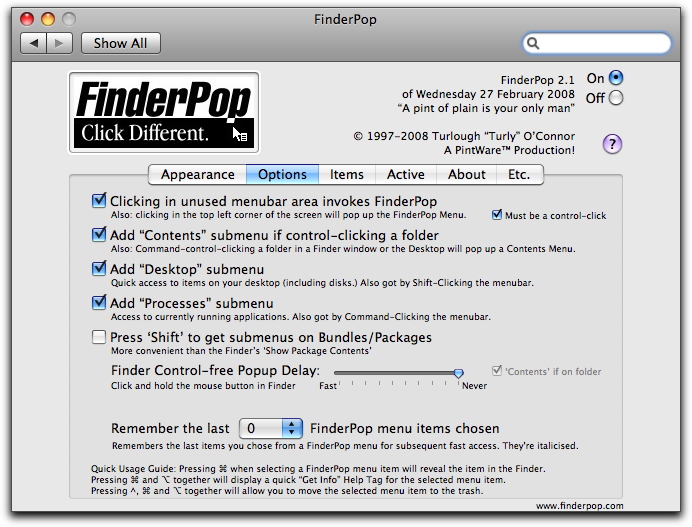
FinderPop is a Prefs Pane that makes OS X’s contextual menus much more powerful.